Larry posted his patch on bug zilla. I tested his patch and the bug is fixed. Although, he mentioned that he hasn't tested the patch on "publish after servers" scenarios and I'm not sure what does that term means to test it for him. Anyway, I posted a question regarding "publish after server" on newsgroup and will test these scenarios when I got a chance. Let hunt for another bug then.
Detail on patch: https://bugs.eclipse.org/bugs/attachment.cgi?id=132132
Working on bug 264203
9:13 PM / Comments (0) / by Kevin Vu
Thanks to Tehereh, After reading her blog I tried again and this bug does exist. Though, the way to reproduce is clearer now: So the scenario is like this:
1. Add new server (Stop state)
2. Add a dynamic web app.
3. Add a jsp file.
4. right-click on jsp and choose “Run on server”.
5. Server starts.
6. Browser get launched
==> NO BUG
7. Stop the server and close the browser
8. right-click on the jsp and choose “Run on server” again
9. Browser doesn’t get launched.
==> BUG
——————————————-
10. Delete server
11. Add new server (Stop state)
12. right-click on jsp file and choose “Run on server” again
13. Browser get launched
==> NO BUG
So basically, After the first time "Run on Server" with no bug. If we stop the server and try to "Run On Server" again. The bug occurs.
I'll be working on this bug then.
Screenshots:
First time "RUN ON SERVER" => NO BUG

The time after the first time "RUN ON SERVER" => BUG

1. Add new server (Stop state)
2. Add a dynamic web app.
3. Add a jsp file.
4. right-click on jsp and choose “Run on server”.
5. Server starts.
6. Browser get launched
==> NO BUG
7. Stop the server and close the browser
8. right-click on the jsp and choose “Run on server” again
9. Browser doesn’t get launched.
==> BUG
——————————————-
10. Delete server
11. Add new server (Stop state)
12. right-click on jsp file and choose “Run on server” again
13. Browser get launched
==> NO BUG
So basically, After the first time "Run on Server" with no bug. If we stop the server and try to "Run On Server" again. The bug occurs.
I'll be working on this bug then.
Screenshots:
First time "RUN ON SERVER" => NO BUG

The time after the first time "RUN ON SERVER" => BUG

Reproduce Bug 264203
8:38 AM / Comments (5) / by Kevin Vu
Bug 264203:
Steps To Reproduce from BugZilla:
1. Create a server (I tried tomcat 5.5 and the j2ee preview server)
2. Add a simple JSP file to the webcontent folder of a dynamic web project
3. Add the web project to the server.
4. Make sure the server is stopped
5. Right click on the JSP and select "run on server"
6. The server starts, but the web browser does not get launched.
MY REPRODUCE :
1. Create a server (I tried with both Tomcat 5.5 and 6.0)
2. Add Web Project
3. Add JSP file
4. Run on Server
5. Server starts, web browser get launched => No bug
Conclusion:
This bug is fixed for lastest build 3.1M6. I tried with both Tomcat 5.5 and 6.0. Notify and confirm this on Bugzilla
Some screenshots for reproduce steps:


Steps To Reproduce from BugZilla:
1. Create a server (I tried tomcat 5.5 and the j2ee preview server)
2. Add a simple JSP file to the webcontent folder of a dynamic web project
3. Add the web project to the server.
4. Make sure the server is stopped
5. Right click on the JSP and select "run on server"
6. The server starts, but the web browser does not get launched.
MY REPRODUCE :
1. Create a server (I tried with both Tomcat 5.5 and 6.0)
2. Add Web Project
3. Add JSP file
4. Run on Server
5. Server starts, web browser get launched => No bug
Conclusion:
This bug is fixed for lastest build 3.1M6. I tried with both Tomcat 5.5 and 6.0. Notify and confirm this on Bugzilla
Some screenshots for reproduce steps:


MessageBox and the return values
11:31 PM / Comments (3) / by Kevin Vu
Good news for me since Peter Liu is looking into my bug :). His knowledge and experience is sure going to help speeding up the progress of this bug :). Anyway, This post is to answer his email and to clear up my first walk through a bit.
My first walk through ends at the saveALl() method which is belong to class: EditorManager.class (package: org.eclipse.ui.internal;)
From the blocks of codes above:
MessageDialog d = new MessageDialog(...);
will define the Save Resource dialog
choice=d.open()
will display the dialog and get the return values when user click YES,NO,or CANCEL.
METHOD THAT DEFINE THE MESSAGEDIALOG:
METHOD THAT DISPLAY AND GET THE RETURN VALUE:
The runEvenLoop(shell) will display and wait until user select one of the button (YES, NO, CANCEL).
The returnCode will return the value that user selected. I tried with YES, NO, CANCEL and the return values are:
YES: returnCode=0
NO: returnCode=1
CANCEL: returnCode=2
GO back to the saveAll() method.
choice will have the return value of open() method above.
If choice=YES, the saveAll() will process on and save all changes (code below), go back out, and server is launched with new configuration.
if choice is NO or CANCEL, saveAll() wont save and just return true or false, go back out, and server is launched with old configuration.
CODES THAT SAVE THE SERVER EDITOR belong to saveAll() method above.
My first walk through ends at the saveALl() method which is belong to class: EditorManager.class (package: org.eclipse.ui.internal;)
Method: saveAll()
Package: org.eclipse.ui.internal
// Use a simpler dialog if there's only one
if (modelsToSave.size() == 1) {
Saveable model = (Saveable) modelsToSave.get(0);
String message = NLS.bind(WorkbenchMessages.EditorManager_saveChangesQuestion, model.getName());
// Show a dialog.
String[] buttons = new String[] { IDialogConstants.YES_LABEL, IDialogConstants.NO_LABEL, IDialogConstants.CANCEL_LABEL };
MessageDialog d = new MessageDialog(
shellProvider.getShell(), WorkbenchMessages.Save_Resource,
null, message, MessageDialog.QUESTION, buttons, 0);
int choice = SaveableHelper.testGetAutomatedResponse();
if (SaveableHelper.testGetAutomatedResponse() == SaveableHelper.USER_RESPONSE) {
choice = d.open();
}
// Branch on the user choice.
// The choice id is based on the order of button labels
// above.
switch (choice) {
case ISaveablePart2.YES: // yes
break;
case ISaveablePart2.NO: // no
return true;
default:
case ISaveablePart2.CANCEL: // cancel
return false;
}
}
From the blocks of codes above:
MessageDialog d = new MessageDialog(...);
will define the Save Resource dialog
choice=d.open()
will display the dialog and get the return values when user click YES,NO,or CANCEL.
METHOD THAT DEFINE THE MESSAGEDIALOG:
package org.eclipse.jface.dialogs;
MessageDialog.class
public MessageDialog(Shell parentShell, String dialogTitle,
Image dialogTitleImage, String dialogMessage, int dialogImageType,
String[] dialogButtonLabels, int defaultIndex) {
super(parentShell);
this.title = dialogTitle;
this.titleImage = dialogTitleImage;
this.message = dialogMessage;
switch (dialogImageType) {
case ERROR: {
this.image = getErrorImage();
break;
}
case INFORMATION: {
this.image = getInfoImage();
break;
}
case QUESTION: {
this.image = getQuestionImage();
break;
}
case WARNING: {
this.image = getWarningImage();
break;
}
}
this.buttonLabels = dialogButtonLabels;
this.defaultButtonIndex = defaultIndex;
}
METHOD THAT DISPLAY AND GET THE RETURN VALUE:
package org.eclipse.jface.window;
Window.class
public int open() {
if (shell == null || shell.isDisposed()) {
shell = null;
// create the window
create();
}
// limit the shell size to the display size
constrainShellSize();
// open the window
shell.open();
// run the event loop if specified
if (block) {
runEventLoop(shell);
}
return returnCode;
}
The runEvenLoop(shell) will display and wait until user select one of the button (YES, NO, CANCEL).
The returnCode will return the value that user selected. I tried with YES, NO, CANCEL and the return values are:
YES: returnCode=0
NO: returnCode=1
CANCEL: returnCode=2
GO back to the saveAll() method.
switch (choice) {
case ISaveablePart2.YES: // yes
break;
case ISaveablePart2.NO: // no
return true;
default:
case ISaveablePart2.CANCEL: // cancel
return false;
}
choice will have the return value of open() method above.
If choice=YES, the saveAll() will process on and save all changes (code below), go back out, and server is launched with new configuration.
if choice is NO or CANCEL, saveAll() wont save and just return true or false, go back out, and server is launched with old configuration.
CODES THAT SAVE THE SERVER EDITOR belong to saveAll() method above.
// Create save block.
final List finalModels = modelsToSave;
IRunnableWithProgress progressOp = new IRunnableWithProgress() {
public void run(IProgressMonitor monitor) {
IProgressMonitor monitorWrap = new EventLoopProgressMonitor(
monitor);
monitorWrap.beginTask("", finalModels.size()); //$NON-NLS-1$
for (Iterator i = finalModels.iterator(); i.hasNext();) {
Saveable model = (Saveable) i.next();
// handle case where this model got saved as a result of saving another
if (!model.isDirty()) {
monitor.worked(1);
continue;
}
SaveableHelper.doSaveModel(model, new SubProgressMonitor(monitorWrap, 1), shellProvider, closing || confirm);
if (monitorWrap.isCanceled()) {
break;
}
}
monitorWrap.done();
}
};
// Do the save.
return SaveableHelper.runProgressMonitorOperation(
WorkbenchMessages.Save_All, progressOp, runnableContext, shellProvider);
Bug240698: Walkthrough - Part 1
10:35 AM / Comments (1) / by Kevin Vu
BUG SUMMARY:
1/ Add new server
2/ Edit Server
3/ Start Server
4/ "Save Resource" prompts. Select "No".
BUG: "Save Resource" prompts again asking for saving changes again even though selected "No" => Wrong behavior (Supposed to prompt one)
WALKTHROUGH 01
Let start at the point when we start the server and walkthrough to the point of "Save Resource" prompts.
I./ StartAction.java
Method: public static void start(IServer server, String launchMode, final Shell shell)
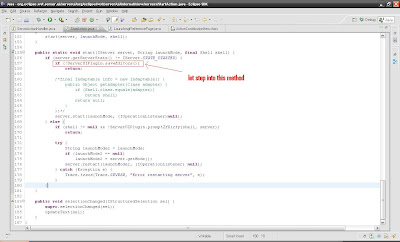
Notice the ServerUIPlugin.saveEditors(). Let's step into this method.
II./ ServerUIPlugin.java
Method: public static boolean saveEditors()

Notice method "saveAllEditors". Let step into this method
III./ Workbench.class
Method: public boolean saveAllEditors(boolean confirm)

Notice method "EditorManager.saveAll". Let step into this method.
IV./ EditorManager.class
Method: public static boolean saveAll

Notice the red circle. This is where the first SaveResource dialog prompts for saving changes. User have 3 options:
YES: saveAll() method will process on and save all changes.
NO: saveAll() method will return TRUE
CANCEL: saveAll() method will return FALSE.
1/ Add new server
2/ Edit Server
3/ Start Server
4/ "Save Resource" prompts. Select "No".
BUG: "Save Resource" prompts again asking for saving changes again even though selected "No" => Wrong behavior (Supposed to prompt one)
WALKTHROUGH 01
Let start at the point when we start the server and walkthrough to the point of "Save Resource" prompts.
I./ StartAction.java
Class defines methods to start servers
Method: public static void start(IServer server, String launchMode, final Shell shell)
This method is to start the server. So let's set a breakpoint here and step into.

Notice the ServerUIPlugin.saveEditors(). Let's step into this method.
II./ ServerUIPlugin.java
The server UI plugin class
Method: public static boolean saveEditors()
save dirty editors, if applicable
@return boolean - Returns false if the user cancelled the operation

Notice method "saveAllEditors". Let step into this method
III./ Workbench.class
primary responsability is the management of workbench windows, dialogs,
wizards, and other workbench-related windows.
Method: public boolean saveAllEditors(boolean confirm)
is to save all server editors

Notice method "EditorManager.saveAll". Let step into this method.
IV./ EditorManager.class
Manage a group of element editors. Prevent the creation of two editors on the same element.
Method: public static boolean saveAll
Saves the given dirty editors and views, optionally prompting the user.
@returntrueon success,falseif the user canceled the save

Notice the red circle. This is where the first SaveResource dialog prompts for saving changes. User have 3 options:
YES: saveAll() method will process on and save all changes.
NO: saveAll() method will return TRUE
CANCEL: saveAll() method will return FALSE.
Eclipse WTP 3.1M5
10:28 AM / Comments (0) / by Kevin Vu
So I downloaded the lastest stable build of Eclipse WTP, bug240698 is still there (was hoping for a miracle :D). Anyway, let fix the thing! ...
What method is triggerred when select "Start" from server context menu?
9:04 PM / Comments (2) / by Kevin Vu
I'm trying to identify the method that is called when right-click on Tomcat server and select "Start". If anyone come across this method, could you please let me know the name of it? Thanks in advance!
